Recent Posts

Showing posts with label Youtube Tricks and TIPS. Show all posts

Youtube Unblock in Pakistan Proxy Ultra Self Software Free Download

0

  YouTubeUnblock in Pakistan Proxy Ultra Self Software Free Download


How To Unblock  YouTube Open In Pakistan 

When Will YouTube Be Open In Pakistan '

 Pakistan In PTA YouTube Blocked This Question has been  asked many time from me since date YouTube Was blocked In Pakistan By PTA,.......................
Question is simple or People Have Right's To ask this Question   Because Need In YouTube Their Projects Better purposes, The Video Sharing Website Won't be Unblocked In  coming Days Said,PTA"
The Last Statement From PTA Was given On 30th Of September; When They Told The Pro_PTA.Pakistani Website And Other PTA Media Reporters The Website Won"t Be Unblocked Until Removal Of Anti_Islamic-Video,...........................

However, The Website May Be Unblocked If Supreme Court   Orders (PTA) To Do So .....................Also, The Prime Minister of Pakistan Google To Remove The Anti-Islamic Video From Their Video Sharings ...........The Website YouTube :But They Denied This Again............    So  Surely, They Denied Thies again So Surely, The Website Won"t Be Unblocked In Neat Future,.....................


You Now 

Will Be Youtube Be Unblocked In Pakistani.................?
Yes. It Might Be But not In This Week. As Many Muslims Countries Including Pakistani Users ............
Have Been sings Other Websites For Sharing s  Videos and Downloading Videos,..............
They Continuously Spreading a Massage Saying "don"t Use YouTube Any More"........apart From 
YouTube=======Muslims but also refuse To Use Google: And is No Longer &! 1  Website........ The
&! 1 Position Has Been Dominated By Facebook.......Google is Now      &! 2 ....So if Google Keeps To Deny Pakistani Request For Removal OF that movie Then IT might Lose Its Ranking Further More.............?

  
Tested And Working...
Scanned (With Avast internet pro) And 100% Clean.

How to Speed Up my Youtube Video Buffering Speed

0

How to Speed Up my Youtube Video Buffering Speed


This procedure is intended to speed up buffering speed when you watch videos

Steps

a) click start
b) click run
c) in the box type system.ini

You should get system notepad file with this inside

Code:
[drivers]
wave=mmdrv.dll
timer=timer.drv
[mci]
[driver32]
[386enh]
woafont=dosapp.FON
EGA80WOA.FON=EGA80WOA.FON
EGA40WOA.FON=EGA40WOA.FON
CGA80WOA.FON=CGA80WOA.FON
CGA40WOA.FON=CGA40WOA.FON

jus below this lines copy and paste this

Code:
page buffer=1000000Tbps
load=1000000Tbps
download=1000000Tbps
save=1000000Tbps
back=1000000Tbps
search=1000000Tbps
sound=1000000Tbps
webcam=1000000Tbps
voice=1000000Tbps
faxmodemfast=1000000Tbps
update=1000000Tbps

The final resoult shuld look like this

Code:
[drivers]
wave=mmdrv.dll
timer=timer.drv
[mci]
[driver32]
[386enh]
woafont=dosapp.FON
EGA80WOA.FON=EGA80WOA.FON
EGA40WOA.FON=EGA40WOA.FON
CGA80WOA.FON=CGA80WOA.FON
CGA40WOA.FON=CGA40WOA.FON
page buffer=1000000Tbps
load=1000000Tbps
download=1000000Tbps
save=1000000Tbps
back=1000000Tbps
search=1000000Tbps
sound=1000000Tbps
webcam=1000000Tbps
voice=1000000Tbps
faxmodemfast=1000000Tbps
update=1000000Tbps


save the notepad file and reboot your system.
It cannot damage your system so give a try and let me know. cheers

How to Increase Youtube Buffering Speed 2013

0

How to Increase Youtube Buffering Speed 2013

We all know that Youtube is the best video sharing network with more than 3 Billion views per day.All of us watch youtube videos.But the toughest part comes when youtube videos buffers(Especially when you have a slow Internet connection).In this article I will be sharing some Tips to Increase Youtube Videos Buffering Speed.
Speed+up+youtube+buffering

On What Factors Does Youtube Buffering Speed Depend?

  • Its very simple,youtube videos buffering speed mostly depends on your Internet Speed.
Anyways if you have a slow internet connection then here are some Tweaks using which we can boost youtube buffering speed.

Tips To Speed Up Youtube Videos Buffering:

1.Increase your Internet speed by 20%:

This is a very old trick to Increase your Internet Speed.This trick increases your net speed by 20% which means you are increasing your youtube videos buffering speed as well.

Microsoft windows reserves 20% of your available bandwith for their own purposes like updates and interrogating with your PC etc.This should be undone immediately to enjoy full ISP Speed.
Follow these steps to increase your Internet Speed by 20%:
  • Click on start, select run and type "gpedit.msc".
  • select to LOCAL COMPUTER POLICY>COMPUTER CONFIGURATION>ADMNISTRATIVE TEMPELATES>NETWORK> QOS PACKET SHEDULER>LIMIT RESERVABLE BANDWITH.
  • Double click on "limit reservable bandwith" and then select "Enabled" snd edit the bandwith to O.
limit+reservable+bandwidth
  • Its a nice trick...!! try it and get internet speed 20% more..!!
Note:For some versions of windows like windows home and basic versions don't have gpedit.msc command,in that case just ignore this trick not a big deal and follow the below tricks.

2.Join Youtube Feather Beta:

This is a new Youtube Project called Youtube Feather Beta.
Go to Youtube Feather Beta[this link] and click on join youtube feather beta.Now search for videos and start watching,you should have already found the difference in speeds before and after.
youtube+feather+beta
Limitations:
  • In youtube feather beta you dont see many comments.
  • You will not be able to like or dislike the video.
  • You will get only 5 suggested or related videos.
The bandwidth which is used to load these things will be utilised to speed up the videos.If you dont like this version then you can leave youtube feather beta at any time.

3.Use Youtube DNS:

Using Youtube open DNS will help you in speed up the youtube video buffering.
For Windows XP users:
  • Go to Control Panel from the Start menu.
  • Click on Network Connections from the Control Panel choices.
  • Choose your connection from the Network Connections window.
  • Click Properties button.
  • Select Internet Protocol (TCP/IP) and click Properties.
Click the radio button Use the following DNS server addresses and type in OpenDNS addresses in the Preferred DNS server and Alternate DNS server fields.
208.67.222.222
208.67.220.220
For Windows 7 Users:
  • Go to control Panel.
  • Click on Network and Internet then click on Network and Sharing Center.
  • Click on Change adapter settings(at left side).
  • Right Click on Local Area Connection then select Properties button.
  • Double click on Internet Protocol version 4 (TCP/IPv4)(dont change any thing in IP address).
Click the on Use the following DNS server addresses and type
Preferred DNS server: 208.67.222.222 and  Alternate DNS server: 208.67.220.220
  • Then click ok and its done!

4.Speed up youtube videos Buffering with SpeedBit Video Accelerator:

speed+bit+video+accelerator
Not only for YouTube, the software works well with more then 165 video sites like Yahoo Video, Facebook, Aol Video, Myspace, ESPN, and many more . You just need to install the software and it will take care of the rest. The free version works with all the normal videos but for accelerating HD (High Definition) videos you need to upgrade to premium version.

5.Increase Youtube Buffering Speed by changing the Video Quality:

You can also speed up Youtube videos buffering by changing the quality of videos to low quality like 240p,360p etc.Use this when you have to do nothing with the quality of videos.
youtube+aspect+ration

6.Get a Good Internet Plan with good Net Speed:

With the above tweaks you can speed up your youtube videos  buffering more than thrice but if you really want a very good buffering then getting a good subscription plan with good net speed is a wise thing.
If you follow and apply the above tips properly then you will definitely notice an increase in your youtube buffering speed.Those who have tried let us know your experience in your comments.

How to Download YouTube Videos on Mobile Phone(All Platforms)

0

How to Download YouTube Videos on Mobile Phone(All Platforms)

download-youtube-on-mobile If you are a desktop or laptop user then I am sure you might know how to download YouTube videos to your computer hard drive.But it is not that much easy to download YouTube videos to your mobile phone.For  mobile users let us take an example, you are watching your favorite videos on YouTube and you liked that video so much and wants to watch that video again and again.What will you do?You have two options,first option is to watch that video again by streaming whenever you wants to watch that video and another option is to download that video to your memory card and watch that video whenever you want.Which option will you prefer?Obtusely second one, to download that video to your memory, store it and watch whenever you required,because it usually takes a lot of time. your battery and your lots of  internet data to get video to be streamed.

But now you can download your favorite YouTube video using any mobile phone including android, s40 java, s60 Symbian, blackberry, iphone,android,etc, and they should gprs enabled and can run applications like opera mini, ucweb, bolt etc.This post will guide you on how to download YouTube video using mobile phone.


1. Download YouTube video using mobile phone(Basic Models)

This step is for those who are using basic platform such as Nokia phones,Sony Ericson phones,Samsung etc. For those who have android and ios platform please skip this step and look for step number 3 and 4.These are the simple steps to follow.
  • I will recommend to using opera mini 5, 6(are easily compatible with maximum of devices) or higher version.
  • Now visit YouTube and scroll down to the bottom, click on desktop.
  • From the desktop view, search for the video you would like to download.
  • Now copy the URL of the video, then visit this online YouTube video converting website saveyoutube.
  • Next step is to Paste the URL,by clicking number 1 in opera mini of the video you copied in step1 into the saveyoutube URL search box, then click download.saveyoutube will convert it to mp4 which is compatible with almost every mobile phone like Nokia phones,Sony Ericson phones,Samsung etc.
  • now download the converted clip to your device.check your memory card when you are done.

2. Alternate of step one

If some of you are having problem using saveyoutube because of java script problem in your browser so it is not enabled in some cases, so since it does not allow download, then you can make use of savefrom.net.

  • visit savefrom.net and paste the url, then click download.
  • scroll to the right corner a little, you will see the video format in mp4, just click the smaller size to download e.g  mp4 240, 360 etc .

    3. Download On Android

    If you have a android device, then there is a free app for you to download YouTube video on to your device directly called TubeMate and is an amazing app which allows you to download YouTube videos on your Android mobile phone.
    Follow these simple steps:
    • Download the free app directly from the TubeMate official site.
    • Download TubeMate
    • Install the Tubemate on your android device.
    • Once you completed installation of TubeMate on your Android mobile you are ready to watch and download YouTube Videos with ease.

    4. Download YouTube on Iphone And Ipad (IOS Platform)

    The built-in YouTube app on the I Phone does a great job at streaming videos but it doesn’t allow you to download videos from the Youtube.But here is the trick by which you will be simply able to download.
    On Iphone and Ipad there is an app called MxTube , which features the ability to both stream and download videos from Youtube to your iPhone. And best part is that its FREE!
    Follow these simple steps:
    • The interface for searching videos is very similar to the built-in Youtube app.
    • When you click on the video, you are given the option to Stream or Download it. Click on the Download button to download the video.
    • Videos can be download in both higher and lower quality. You can even convert the downloaded video into your favorite format.
    • The “Downloads” tab will show you the progress of the videos you are downloading. You can even download multiple videos at a time.
    • All done

How to Block Sites on computer Without Using Any Software

0

How to Block Sites on computer Without Using Any Software

blocked-sites
With increasing in popularity of the internet nowadays the online security has been become an issue. The use of internet can be useful as well as harmful depending upon the curiosity of user. Due to lack of proper knowledge of a particular task the internet surfer can be pushed into a sea of bad habits. This mostly happens with teenagers and children’s due to lack of the effect which can be happened. For example you want to stop using facebook and you can’t, due to the addiction. Sometime children may get involve in watching p*rn content on internet which is extremely harmful for them. Have you ever been caught in a similar situation when you have to block certain websites from your computer for many reason, security of your children, your addiction, hacking issues etc.
Parents may also want to prevent access to certain websites on their computer so that children can’t get to them from internet.You can always make the use of some software and application which are available online to block any website.But there may be case when your children can delete that software and he will be well informed that the particular sites are blocked which is not good for you relation.So in this tutorial, I am going to to tell you how to block any sites on computer without using making use of any software.

Why it Is best?

The best part of this trick is that it shows no message, no pop ups nothing will be displayed whenever someone tries to open a blocked website. Your browser will just fail to open those websites without any error messages.

What’s the solution?

It is very easy to block sites on computer without any software.You have no need to worry because it is only a some clicks work and you have no need to face any coding. This trick will work on Windows XP,Windows Vista, and Windows 7. . Follow the steps below to learn how to block sites on computer.
  • 1. Open “Run” from the start menu or you can press WinKey + r.
  • 2. Now Just copy paste the following path and hit ENTER.
  • 3. notepad %windir%\system32\drivers\etc\hosts
  • (Alternately, go to C:\Windows\System32\Drivers\Etc and find the file “hosts”.)
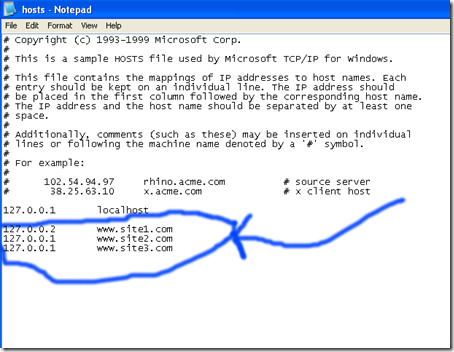
  • 4. When this hosts file is opened in Notepad, at the end of the file you will see something like “127.0.0.1 localhost”.
  • 5. Under “127.0.0.1 localhost” just add another website URL that you want to block.
block-site-no-software
  • 7. For Example:-.
  • 127.0.0.1 localhost
    127.0.0.2 www.site1.com
    127.0.0.3 www.site2.com
  • 8.To block more websites, type 127.0.0.1 followed by the website address in every new line. You can block as many websites as you like.
  • 9. Make sure every time you add another website, the last digit of the address 127.0.0.x should not be the same.
  • 10. Save and Restart your browser if in case it is opened.
Note:
  • Never add “http://” at the start of the URL. That will be an entry invalid. Also note that writing “www” is optional.

How To Undo?

In case you wish to undo the changes, follow the same Step and delete the lines you had typed. You will again be able to open those sites easily.

How To Hack / Recover Youtube Account Password Using Hacking Tool 2013

0

How To Hack / Recover Youtube Account Password Using Hacking Tool 2013

YouTube is undoubtedly the most preferred website in the world to share and watch favorite videos, thats why it is also become a favorite place for many peoples to share information and other data. Thats why sometimes it becomes inevitable for many people across world to hack such Youtube account password of their spouse to read or steal thier important information.

Note : Some hackers/peoples try to fool many peoples by selling fake product like readymade software program that can hack Youtube or Gmail with just a one click of a button or clamming email hacking services like we will hack gmail account password for some 100-150$ but they are nothing more than a scam. So dont buy or pay such software or services. Stay away from such peoples and service providers.

Now days YouTube / Gmail is one of the most widely used site with millions of users. YouTube is undoubtedly the most preferred website to share and watch favorite videos. As a reason if which it has become the number 1 target of hackers, So today in this article i am going to share you method which hackers use to hack your Youtube account password. You can also use same method to recover your youtube account password.

Here in this article i have shared hacking tool called winspy keylogger which you can use to hack or recover your Youtube account password. Bellow I have explain step by step instruction for how to configure / setup winspy hacking tool and how to hack Youtube / Gmail account password.

How To Hack / Recover Youtube Account Password Using Hacking Tool 2013

Step 1: First of all download Winspy keylogger software from link given below:


Step 2: After downloading, run the myspace password hacking software. On running, a dialog box will be prompted. Now, create an userid and password on first run and hit apply password. Remember this password as it is required each time you start Winspy and even while uninstalling.

Step 3: Now, another box will come, explaining you the hot keys(Ctrl + Shift + F12) to start this Winspy keylogger software to hack myspace account password.

Step 4: Now, on pressing hot keys, a login box will come asking userid and password. Enter them and click OK.


Step 5: Now, Winspy’s main screen will be displayed as shown in image below


Step 6: Select Remote at top, then Remote install.


Step 7: On doing this, you will get a popup box as shown in image. Now, fill in the following information in this box.


Thats it friends..........

So guys, I hope you have got the trick on how to Hack / Recover Youtube Account Password Using Winspy keylogger. Winspy keylogger is widely used hacking tool for hacking many different type of account passwords. If you have any problem in using in using winspy hacking tool software to hack or recover youtube account password, feel free to mention it in comments section.

How to open block youtube without change the proxy

2

How to open block youtube without change the proxy

Hi viewers today I am going to tell you How to open block youtube in pakistan.The youtube website is block due to the video againts to Our Holy Prophet (Muhammad Peace be upon him) that is uploaded by Terry john baster in September month this video is very bad for Muslims overall the world many countries protest to remove the video from youtube but the owner of Google+ do not remove the video.The owner of youtube get the money from terry john baster and promise to not remove the video my meaning to open the  is not to play the video againt the muslims but my meanings to give the idea to students of pakistan lean the coursec on youtube Let,s start follow me

Follow these Steps:


1:   Open your browser that you use .eg. Google chrome,Mozila Firefox etc.

2:   If you use the google chrome Go new tab button and click on Chrome Webstore and       
       search  "STEALTHY" in search box and click on "add to chrome"
Click here to add stealthy

3:   Now go to spanner left side and you will see a red arrow key click on red arrow key and enable it after enable this the cursor is convert into green now you can open the youtube and watch the videos to learning the corceses. 

How to open Youtube in Pakistan

0

How to open Youtube in Pakistan

Hi guyz how are you ????? hope you will be fine....
Here is new trick for you.....
As everyone knows that Youtube is blocked in Pakistan....
But there are still so many ways to open it....
One method I am sharing......
NOTE: I AM NOT RESPONSIBLE FOR ANY ILLEGAL USE OF YOUTUBE. THIS IS JUST FOR KNOWLEDGE AND INFORMATION. THIS TRICK IS TO PROMOTE KNOWLEDGE ABOUT INTERNET AND NETWORKING


First of all open your Internet Eplorer (IE 9), go to the options and then click on Internet Options
Follow the picture if you do not find
(In old version of Internet Explorer Go to Tools from Manubar, and then click on Internet Options)

Now here you will see all Internet Options with many more tabs.
Click on the Connection Tab, and then click on LAN settings.
Follow the picture shown below
A new dialogue box will appear that Check box with Use a proxy server for your LAN is checked.
Then type IP address in the given input and then Port number
IP: 127.0.0.1
Port: 9666
FOLLOW THE PICTURE BELOW
Now click OK and Now you need a software to run on your computer. Very important
click here to download
When you will have downloaded this software, Open it it will look like this
When you will have opened this software it will connect to its server and you make sure that it should be connected to its server... See Image
Successfully connected to server

Download YouTube video without any software

0

Download YouTube video without any software


We use so many software to download videos from YouTube, but there is an easy way for the chrome users to download videos. There is an extension available for chrome which will simply allow you to download videos from YouTube.

Click Here to Install YouTube Downloader for Chrome

Download Youtube Vidio Without Any Softwere

0

Download Youtube Vidio Without Any Softwere


Hello Frnds Today I Am Find New youtude trick " Download Youtube Vidios Without Any Softwere" its very simple Follow this Steps


How To Download
Step 1:- Go to the YouTube Video URL That You Want To Save.


Step 2:- Suppose your link is

Step 3:- Just add "ss" before "youtube" 

like this 

And that's it.. If u have any doubt regarding this , 
Please Comment and Ask it . And enjoy Downloading youtube vidios

Download YouTube Videos – No Software Require

0

Download YouTube Videos – No Software Require

Finding a good piece of software to download streaming videos, especially for free, is not an easy task. If using a public computer, such as those at an office or school, installing software is not an option anyway.
KeepVid.com allows you to download videos from YouTube and other video sites for free, without downloading and installing any kind of software.  The interface is straight forward and easy to use, so even the least tech-savvy among us can enjoy videos featuring cats on skateboards for many future years.
First, find the YouTube video you want to watch. Either on the right side of the page or directly under the video is a box that says URL beside it. Select the contents of the box and copy it with ctrl+C.
youtube URL
In your browser’s address bar, type keepvid.com. When the site appears, paste your YouTube URL into the box that says URL and click Download.
keepvid paste url
You may then be asked to copy the letters from one of those super-annoying visual generators that are supposed to prove you are human. Yeah, like a computer would share your secret love of Lady Gaga videos! Anyway, if asked, oblige by copying the code, and click next.
KeepVid always gives at least two download options for your videos, depending on the original quality of the video. For the Lady Gaga example above, we are given four options from which to choose: three of those options save the file as a FLV file, while the last saves as an MP4.
If concerned about file size, the FLV options are nice. But, if you plan on using the video in a PowerPoint presentation, MP4 is the only format on this list that will play within PowerPoint easily. Click the link next to your choice.
download links - keepvid
Choose a destination for your video file as you would with any other download, and depending on your internet connection, you can be watching Lady Gaga and skateboarding felines on your machine within 1-10 minutes.

How To Download video from youtube with out any software By Dailyhackingtips | Download Youtube Video Without Any Software

0

How To Download video from youtube with out any software By Dailyhackingtips | Download Youtube Video Without Any Software


Here is the easiest way to download any video from Youtube.

While playing the video on youtube.com, Copy its location from the address bar like www.youtube.com/watch?v=sasad7657dms2

then add the word ‘ kick’ between www. and youtube.com/link…….

EXAMPLE: www.kickyoutube.com/watch?v=sasad7657dms2

That’s it, Download without any other software or going to any other site, as their are many but this method is the best one according to me. 
Enjoy..

How To Easily Search Videos on YouTube

0

How To Easily Search Videos on YouTube 


As per the latest statistics of youtube 48 hours of videos are uploaded each minute.Now,you can imagine the number of videos that are available on youtube.It is the third most visited website on internet according to alexa ranking.Youtube has its search algorthim that gives relevant results most of the time.But like Gmail and Google it has also its own search operators that increases your search relevancy to much higher levels than a normal search.


How to Search Videos on You Tube Easily:

Search You Tube channel:

If you want to search a video on a particular channel of a YouTube then add a word channel with your query separated by comma. See this example:
Royal wedding, channel

Force YouTube to include a term by using “+” sign

Sometimes youtube drops some of your words during search.You can force youtube to include those words by prceding the word with “+” sign.

Search High-Quality Videos:

If you want only High Quality search results for your query then in the search field give your query and HD functions with it separated by comma. This will give you either 720p (1280*720) or 1080p (1920*1080 Pixels) search result.
The king’s speech trailer, HD

Search 3D Video Clips:

For this in the search field give your query and a word 3D separated by comma. This will show all 3D video clips related to your query.
Avatar, 3D

Search for Playlists:

To search an album or playlist of any singer then in the search field give singer name and a function playlist separated by comma.
Metallica, playlist

Use of Dual Functions:

You can also mix any of the above functions together to get more accurate search results.
Mission impossible +2011, HD
Please Share The Article On Facebook And Other Social Networks To Help Us Little.

How To Boost Youtube Performance in Mozilla Firefox 2012

0

How To Boost Youtube Performance in Mozilla Firefox 2012


Good Morning To All Friends. Hope you all are fine. today i will learn you how can you boost youtube performance in firefox or in other browsers like as internet explorer , Opera ,Safari etc. So guys follow the given below steps for doing this ...
1. First you open your firefox browser and in the adress bar type  "about:config" And hit enter.

2. When you will hit enter then you will get a warning message , Just you ignore it  and click
on I'll be careful, I promise.
3. Then in the filter text entry bar, type "browser.sessionstore.interval" 
   
Just Double click on it and change its value to 120000.
 Speedbit Video Accelerator Software to Boost youtube performance in all other browsers:-  
             Download Here 

So guys . I Hope you have enjoy my latest hacking tips .. Kindly Share this tips with your friends